Your AI onsite guide
Find the fault before you ring the helpline.
Every manufacturer manual, fault code and service figure for 2,300+ gas boilers, in one place. Stuck on one? Ask Flint and get a straight answer off that boiler's own manual in seconds, page and all. An extra pair of hands, not a replacement for one.
Then £3.99 a month or £29.99 a year. Cancel any time.
A simple service, the hard way
You've been here.
Flint gets you the same answer in seconds, not a phone queue.
What's inside
The whole job, in your pocket.
Not just the PDF
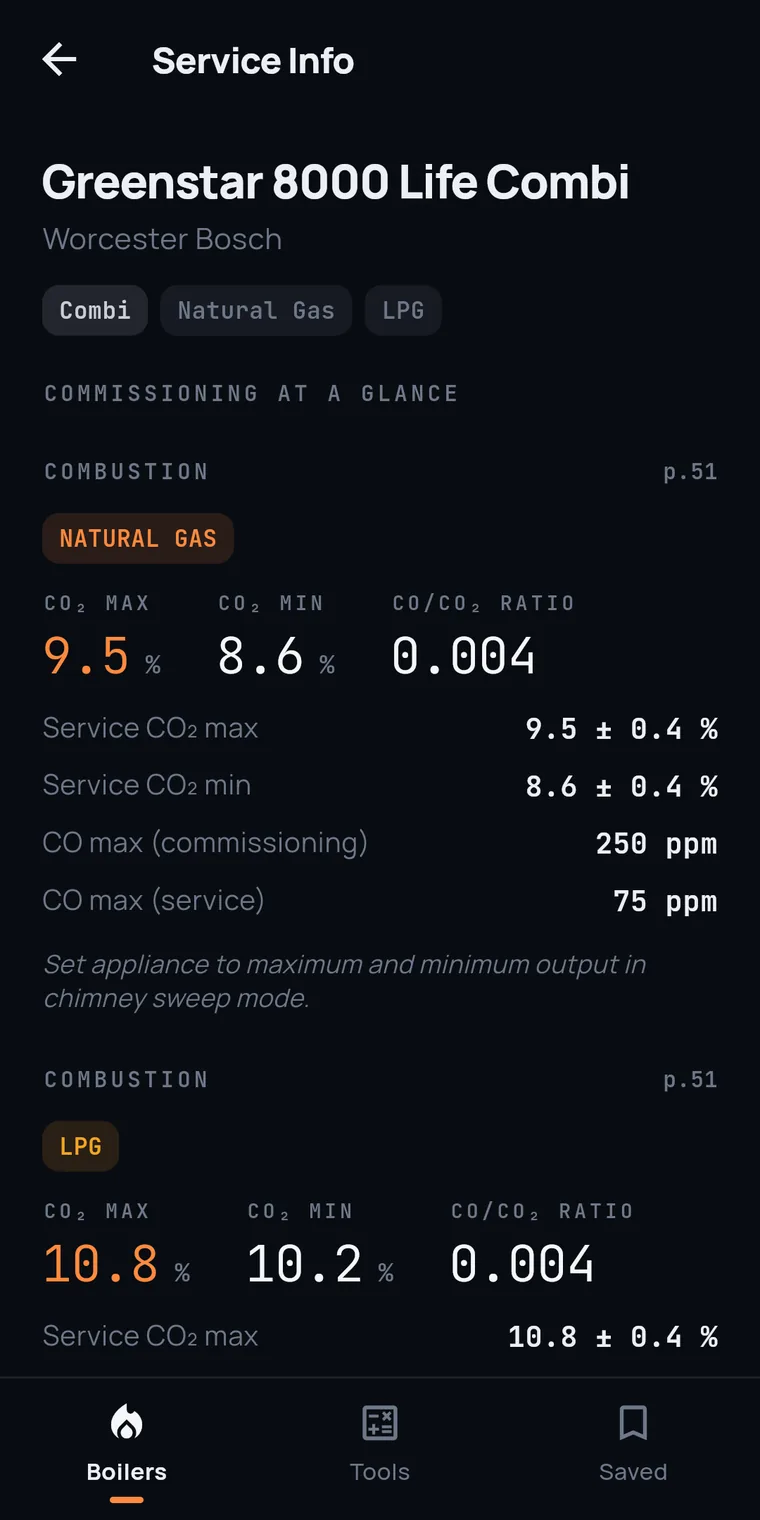
The manual, structured.
Flint lifts the figures out of the manual and lays them out like instrument readouts, so a service isn't a scrolling exercise. Open any section and the data is already there.
A second opinion, in seconds.
Nobody's saying a chatbot knows your trade better than you do. Flint just reads the manual faster than you can. Ask about the boiler you're stood at, or tap a fault code and ask what's worth checking, and you get a straight, step-by-step answer off that model's own manual, with the page to prove it.
- Filling loop passing. Even slightly, it'll creep the pressure up. Check it's fully closed and not weeping.
- Expansion vessel pre-charge not set to the cold-fill pressure, or vessel undersized for the system volume.
- Vessel isolation / waterlogging on an external vessel, or a dead-leg on the zone valve holding pressure.
Sources: Greenstar 30i installation manual, p.42 (filling), p.51 (expansion vessel).
Unsafe situations, classified
Tap through what you've actually found and Flint gives you the IGEM/G/11 classification with the required action, numbered, in the order you do it. Where the incident is RIDDOR-reportable it says so and gives you the deadline.
It's a paraphrased summary of IGEM/G/11 Edition 2, written for speed on site. It isn't the standard itself and it doesn't replace your judgement. Confirm the classification yourself before you leave.
The full service data
Combustion targets at max and min, gas and burner pressures, gas valve settings, NTC sensor tables, spare part numbers and wiring diagrams, laid out as figures rather than a PDF to scroll. Every value carries its manual page.
It won't go past the manual
Answers come from that model's manufacturer manual and a gas fault-finding reference, built with Gas Safe registered engineers. It won't contradict the manual or invent a procedure. The only method it'll walk you through is the standard, safe way to carry out a test.
It shows its working
Step by step, in real figures, with the page cited, exactly like a good answer off the phone. You can check every line against the book.
You're the engineer. Flint just fetches.
It doesn't decide, it doesn't sign anything off, and it doesn't authorise the work. The manual gates that on a competent person with a conforming analyser, and that's you. Flint only gets you the figures faster.
Pricing
One price. Everything in.
First 7 days free, in the app or on the web. Cancel inside the week and pay nothing.
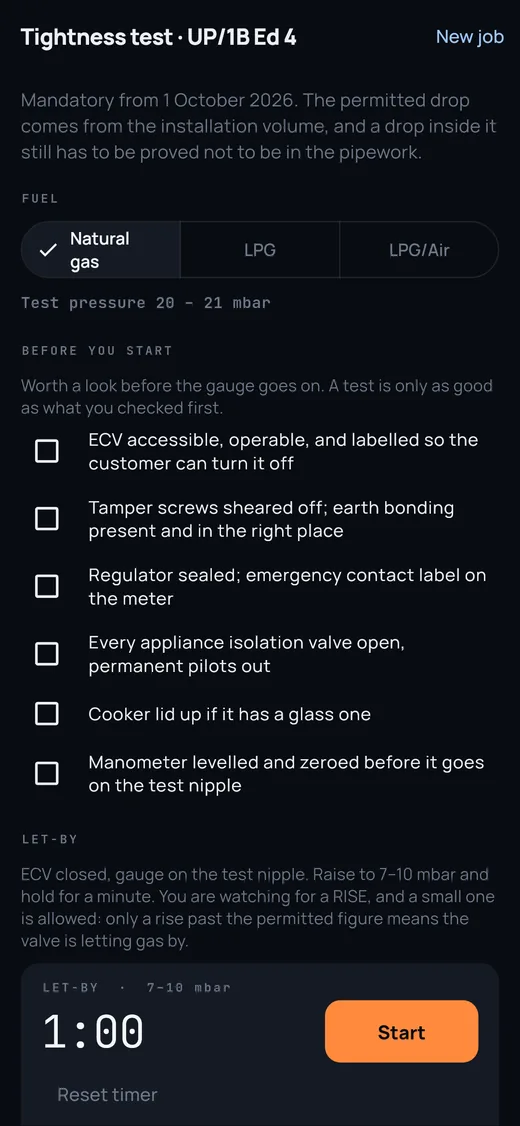
Every manual, fault code and service figure for 2,300+ gas boilers. Search by fault code, the fault-finding charts, the Edition 4 tightness test, the smart meter guide, boiler age, the calculators, every maker's helpline, the unsafe-situations classifier, and Ask Flint answering off the boiler's own manual. One saved callback covers the year.
Built for UK gas engineers.
Servicing and repair, domestic gas boilers. If you're a few years in, it's the mate you'd have rung, without the hold music. If you've been on the tools thirty years, it's a sanity check and every manual in one place, instead of hunting each one down. Either way it's fast, one-handed, and grounded in the manufacturer's own data.
Free on this site
No account, no app.
Before you ask
Straight answers.
Is my boiler in there?
2,300+ gas boilers across 45 makers, from the big names to the ones you'd forgotten existed. Search by model name, GC number, the maker's own code or a fault code. If one isn't in there yet, tell us in the app and we'll add it. Check the full list.
How much is it?
£3.99 a month or £29.99 a year, the same price wherever you buy it, and you cancel wherever you subscribed. The first 7 days are free wherever you subscribe. That includes everything: every manual, fault code and service figure, the calculators, the helplines and Ask Flint. There is no free version.
Where do the AI answers come from?
Every Ask Flint answer is built from that model's own manufacturer manual and a gas fault-finding reference put together with Gas Safe registered engineers. It cites the manual page so you can check it, and it won't go past the manual or invent a procedure. You're the engineer signing it off, not the app.
Is the unsafe situations tool official?
No. It is a paraphrased summary of IGEM/G/11 Edition 2, written so you can tap through it on site and get the classification (Immediately Dangerous, At Risk or Not to Current Standards) with the required action in order, plus a flag when something is RIDDOR-reportable. It is guidance, not the standard itself, and it does not replace your judgement: confirm the classification yourself before you leave the installation.
Can I search by fault code?
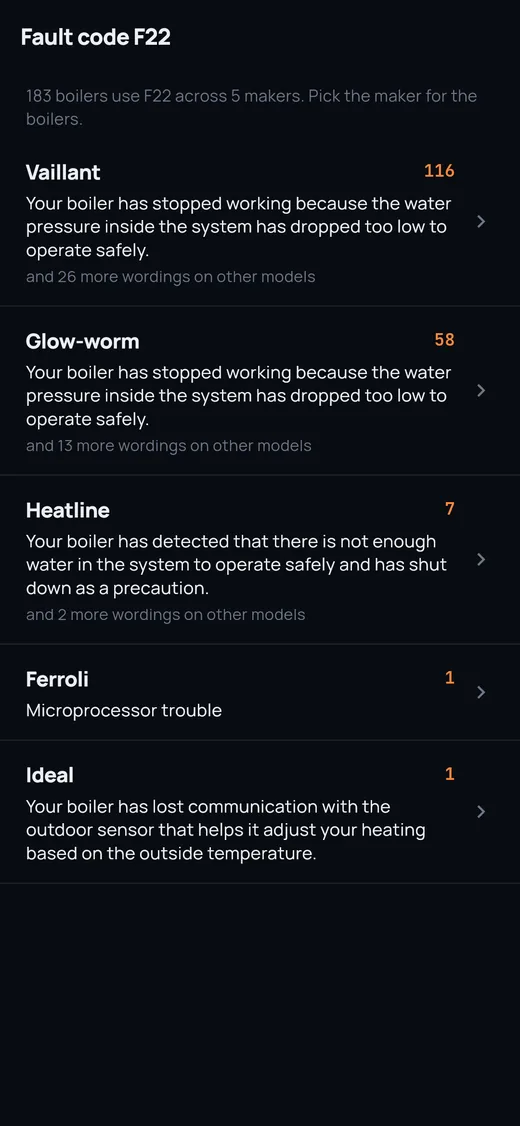
Yes. Type the code off the display into the search on the home screen and Flint lists every boiler that uses it, grouped by maker with what the code means, and a tap takes you into that boiler's codes. Useful when you know the code but not yet which model it is.
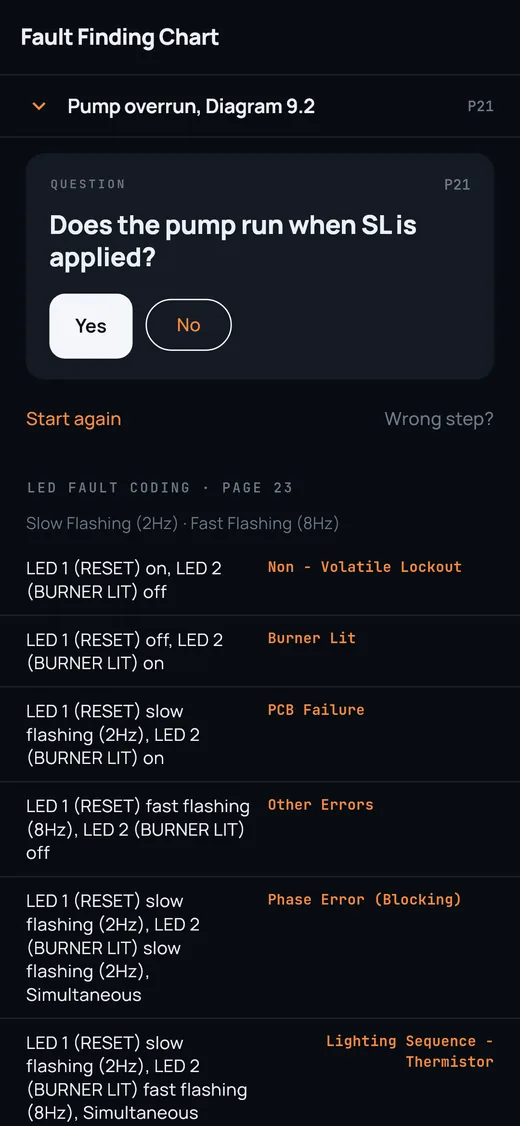
What are the fault-finding charts?
Many manuals, older ones especially, fault-find with a flow chart rather than a list of codes. For 1,100+ boilers Flint walks that chart with you a box at a time, Yes or No, with the manual page one tap away. The charts are read from the manual by machine rather than checked by hand, so if a step looks wrong, the page is there to check and you can report the box.
Can Flint tell me how old a boiler is?
Type the serial number off the badge and Flint works out the make and the date of manufacture, and shows the arithmetic so you can check it. It only decodes where the manufacturer publishes the rule. For the makers who don't, it says so and gives you their own route, because a confident wrong year is worse than no answer when there's a warranty or a replace-or-repair quote riding on it.
What does it run on?
iPhone and Android, and the browser at app.flintfix.com. One account works across all three.
Get the app
Be the engineer who walks in already knowing.
Prefer the browser? Open Flint at app.flintfix.com
7 days free, then £3.99 a month or £29.99 a year. Cancel any time. If you were sent a code, redeem it at app.flintfix.com before you install.